From code to deployment
A sample technical note with Java, shell commands, YAML, and two diagrams of a deployment workflow.
This is an example note for trying out the layout: a little backend code, a few deployment commands, and two diagrams. The examples are deliberately small, so the focus is on how code, images, and longer explanations fit together.
Start with a small backend
A simple endpoint is enough to give us something to reason about. It takes a request, returns a response, and can eventually run inside a container.
A small Spring controller
Here is an illustrative Java controller using the Spring Framework:
 1import java.util.Map;
 2import org.springframework.web.bind.annotation.GetMapping;
 3import org.springframework.web.bind.annotation.RestController;
 4
 5@RestController
 6public class StatusController {
 7
 8    @GetMapping("/api/status")
 9    public Map<String, String> status() {
10        return Map.of("status", "ok");
11    }
12}
The response is intentionally straightforward. A real application would add its own domain logic, but a small example makes it easier to see the structure without getting lost in the details.
Keep the local loop short
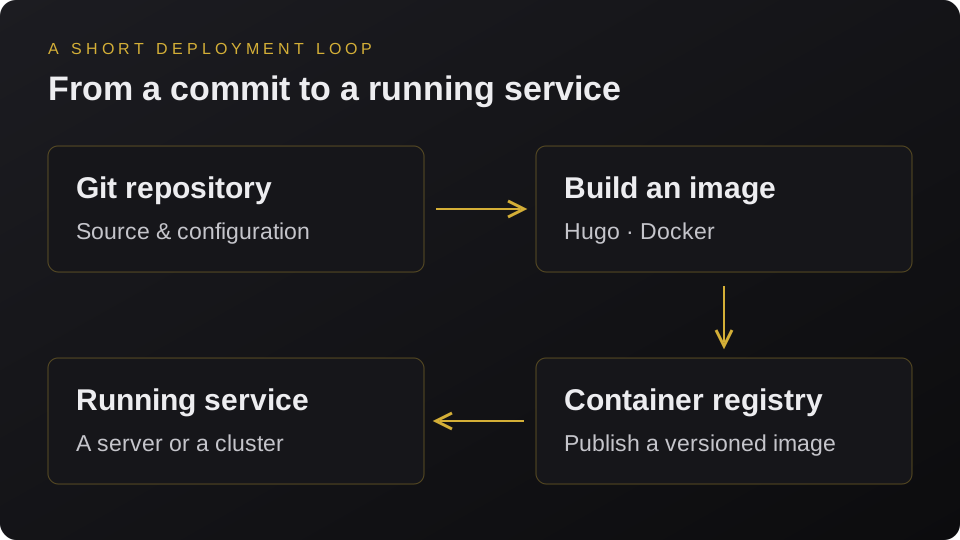
Moving from source code to a running service involves a few distinct steps. The same general idea applies to a backend application and to this Hugo website, even though their build steps are different.
Build and run the website
For this site, Hugo generates the static files during the Docker build, and nginx serves them from the final image. The local preview can be started with:
1docker build \
2  --build-arg HUGO_BASEURL=http://localhost:8080/ \
3  -t ringhus:local .
4
5docker run --rm \
6  -p 127.0.0.1:8080:80 \
7  ringhus:local
The website is then available at http://localhost:8080/. Changing its content means rebuilding the image; during writing, hugo server --buildDrafts provides a faster feedback loop.
Describe the desired state
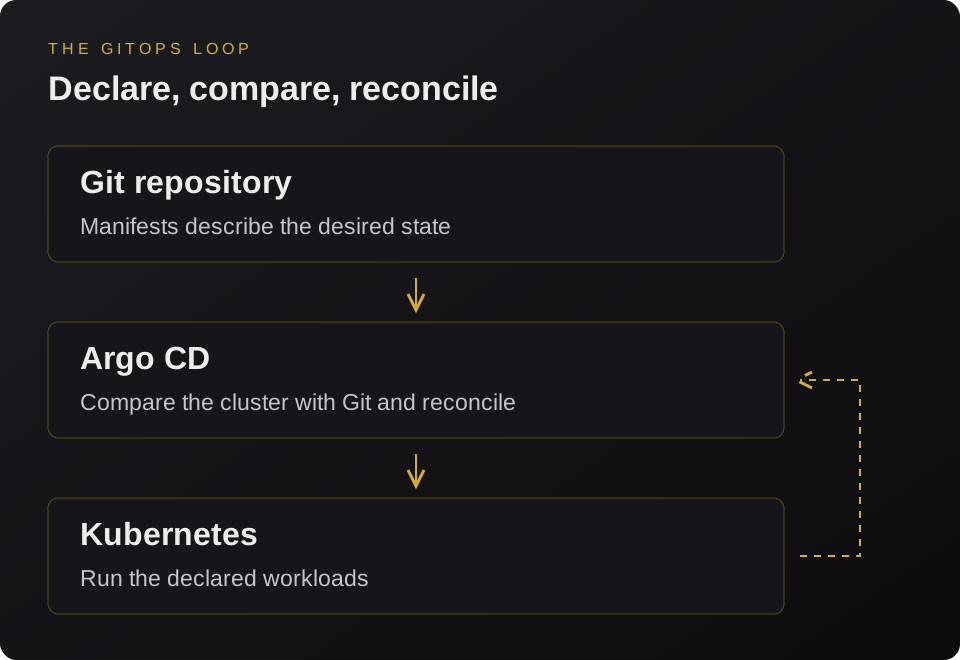
With GitOps, the repository can also hold the configuration describing what should be running. A tool such as Argo CD compares that desired state with the state of the cluster and reconciles the differences.
A minimal Kubernetes Deployment
This illustrative manifest shows the structure of a Deployment. The image name is a placeholder for a published website image; networking can be configured separately with a Service and an Ingress.
 1apiVersion: apps/v1
 2kind: Deployment
 3metadata:
 4  name: website
 5spec:
 6  replicas: 1
 7  selector:
 8    matchLabels:
 9      app: website
10  template:
11    metadata:
12      labels:
13        app: website
14    spec:
15      containers:
16        - name: website
17          image: ghcr.io/example/website:1.0.0
18          ports:
19            - containerPort: 80
The application code and the deployment configuration have different jobs. Keeping both understandable makes it easier to follow a change all the way from a commit to a running service.
A few things to take away
A useful deployment workflow should be easy to understand, repeat, and inspect when something goes wrong.
- Keep the local feedback loop short.
- Use explicit image versions in deployment configuration.
- Make the desired state visible in version control.
This note is just a layout example. Future notes can dig into individual parts of the workflow, while the Projects section remains the place for the things I build.